 CRATE
CRATE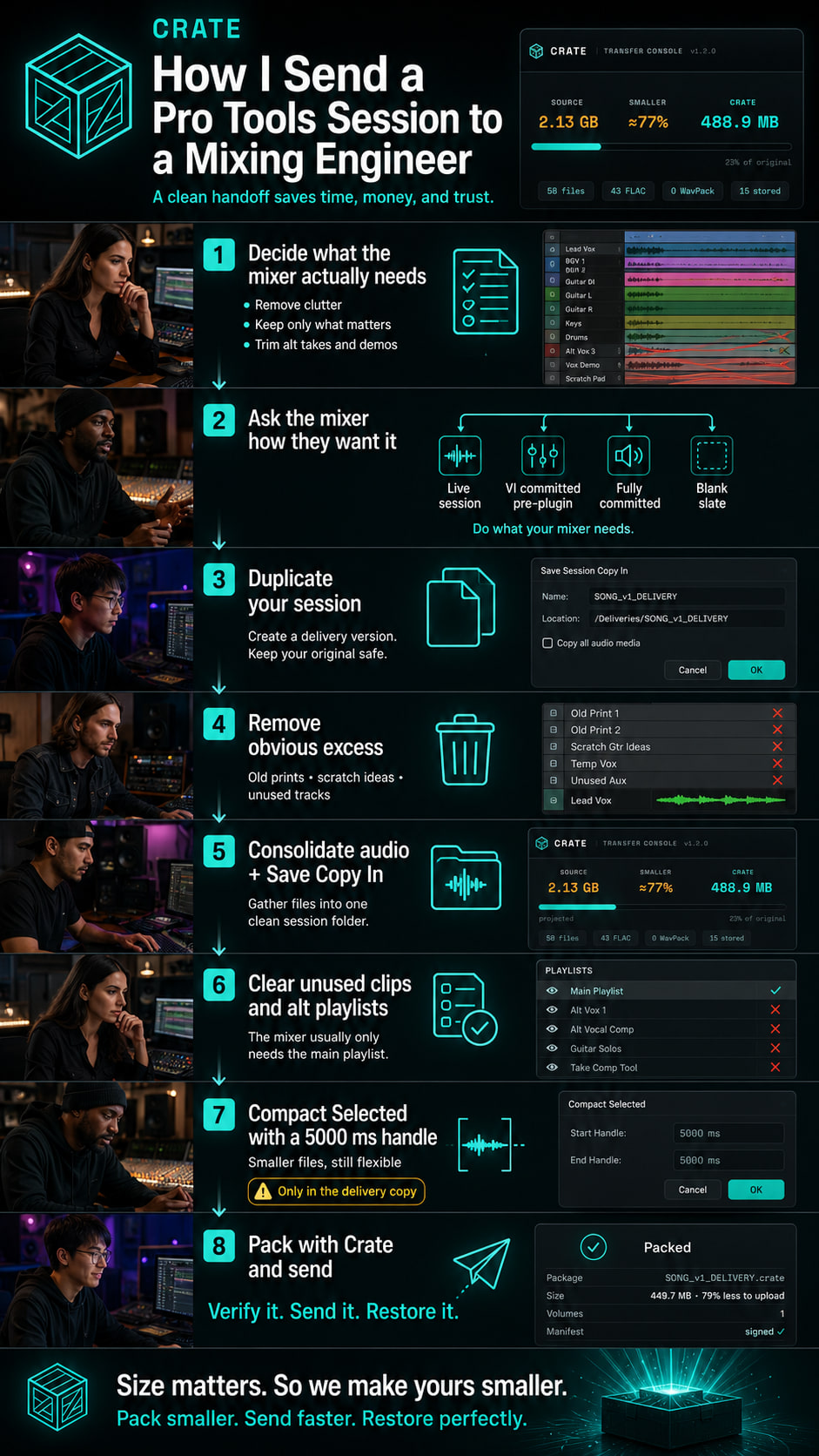
I've learned the hard way that "send me the session" is one of the most dangerous simple sentences in audio.
It sounds straightforward.
It rarely is.
If you send too much, the file is bloated and takes forever to upload. If you send too little, the mix engineer is missing audio, playlists, printed sounds, or context. If your session references files from three different drives, you can end up with missing links. If you leave in every alt take, scratch vocal, demo layer, and abandoned experiment, you can turn what should be a clean handoff into a giant mess.
So over time, I developed a practical workflow for sending Pro Tools sessions to a mixing engineer. It is not glamorous, but it saves time, lowers stress, and dramatically cuts the odds that I send a broken or needlessly huge session.
This is the workflow I would actually use.
Step 1: Decide what the mixer really needs
Before I touch any technical command, I ask the simplest question first:
What actually needs to go?
That sounds obvious, but this is where a lot of session bloat starts.
A mixing engineer usually does not need every single thing that happened during the production process. They probably do not need every alt take you tried and abandoned. They probably do not need rough ideas that never made the arrangement. They may not need demo guide layers, scratch vocals, hidden experiments, or old muted tracks that belong to the writing stage rather than the mix stage.
If I send all of that, I'm not necessarily being thorough. I might just be making the handoff heavier and less clear.
So before I package anything, I do a creative cleanup pass.
I go through the session and ask:
- Is this in the final arrangement?
- Does the mixer need this to make decisions?
- Would I be annoyed to receive this if I were mixing the song?
If the answer is no, it comes out of the delivery version.
That does not mean I delete it from the master production session. It means I do not make the mixer carry the entire archaeological dig of the song unless there is a good reason.
A clean mix delivery should feel intentional.
Step 2: Call the mixer and ask how they want the session
This is the step people skip, and it can save hours.
Before I start committing, printing, deleting, consolidating, or cleaning too aggressively, I contact the mixing engineer and ask:
How do you want the session delivered?
Different mixers work differently.
Some engineers want the session exactly as it currently is. They want the plugins live. They want the virtual instruments live. They want to open the session and be able to tweak the production choices freely. If that is the request, I do not start printing everything unless I have a reason to.
Other engineers want the session to stay flexible, but they do not want virtual instruments to remain dependent on my system. In that case, I may commit the virtual instruments first, but do it pre-plugin. That gives the mixer reliable audio instead of software instruments that may not open on their system, while still leaving the mixer room to shape the sound with processing.
Some engineers want everything committed exactly as it sounds in the production. That means all audio is printed through the plugins, instruments, and processing chains, creating new rendered audio tracks. When I do that, I like to keep the original tracks as a safety measure by hiding them and making them inactive. That way the session stays clean for the mixer, but I still have a recoverable path if something needs to be revisited.
And then there are the blank-slate mixers. They may ask me to remove plugins, bypass production processing, and send the song in a rawer form so they can build the mix from the ground up. That is not wrong. It is just a different workflow.
The point is: I do not assume.
The mixer's delivery preference changes the whole prep process.
There are really four common delivery styles:
Live session
Plugins, instruments, routing, and production choices stay active.Virtual instruments committed pre-plugin
Software instruments become audio, but the mixer still has freedom to process.Fully committed production audio
Tracks are rendered through the plugins and production chains. Originals are hidden and inactive for safety.Blank-slate delivery
The mixer receives clean audio with plugins removed or bypassed, depending on what they request.
The best delivery is not the one I personally prefer. The best delivery is the one that gives the mixer what they need to do their best work.
So I ask first.
Then I prep.
Step 3: Duplicate my working session and prep a delivery version
I never do destructive cleanup in my main working session first.
I make a delivery version.
That way I can be aggressive and tidy without worrying that I'm destroying the master work file. This is especially important because some of the later file-management steps are not reversible in the casual sense.
So I create a clearly named version like:
SongName_MixPrep
or
Artist_Song_MixDeliveryPrep
That gives me freedom to clean the session for delivery while keeping the original intact.
If I'm committing tracks, removing plugins, deleting unused playlists, or compacting audio, I want all of that happening inside a version that exists specifically for delivery.
The original production session stays safe.
Step 4: Delete or remove obvious excess before I archive
Now I start trimming the fat.
This is where I get rid of anything that does not belong in the delivery version.
That may include:
- alt takes that will not be used
- demo tracks
- tried regions and scratch ideas
- hidden or inactive tracks that are not part of the final
- duplicate rough bounces that have no value to the mix engineer
- abandoned production experiments
- old printed versions that have already been replaced
- reference tracks that should not be part of the mix session unless clearly labeled
This part is less about Pro Tools commands and more about discipline.
A clean session is easier to send, easier to understand, and easier to mix.
The goal is not to erase the creative process. The goal is to avoid handing the mixer a bloated session full of decisions they should not have to decode.
Step 5: Consolidate the audio and use Save Copy In to gather the session
This is one of the most important technical steps.
A Pro Tools session can look organized on the screen while still referencing audio from scattered places: old audio folders, external drives, desktop folders, imported files, previous production sessions, or source files that are much longer than the clips being used in the timeline.
That is dangerous when you are sending a session to someone else.
The mixer should not have to relink files from your personal drive structure. They should not open the session and discover that half the audio points to a drive they do not have. They should not be missing a vocal because it was referenced from an old folder outside the session.
So this step is about making the delivery session self-contained.
First, I make sure the audio in the session is in the form the mixer actually needs. If clips are referencing long, scattered, or messy source files, I consolidate the audio so the session is cleaner and easier to transport.
Then I use Save Copy In to create a fresh delivery copy of the session with the audio files included.
This is different from simply duplicating a folder in Finder and hoping everything came along. Save Copy In is the proper way to create a new copy of the session for delivery or archive, with the media gathered into the new session folder when the right options are selected.
My usual intent here is simple:
- make a fresh session folder
- include the audio files
- keep the session format, sample rate, and bit depth appropriate
- avoid unnecessary conversion unless there is a specific reason
- create one clear folder that can be packed and sent
This is the point where the session starts becoming transportable.
It is also where a lot of missing-file problems are prevented before they ever reach the mixer.
Step 6: Remove unused clips and clear unnecessary alternate playlists
Now I work inside the delivery copy and remove what does not belong.
This is where I clean up the clip list and the playlist situation.
In a working Pro Tools session, playlists are incredibly useful. They hold alt takes, comp passes, alternate vocals, alternate solos, old edits, doubles that almost made it, and versions that helped us get to the final performance.
But a mix engineer almost always needs the main playlist.
Not always, but almost always.
If there are alternate playlists the mixer truly needs, I keep them and clearly communicate why they are there. But if the alt playlists are just old takes, experiments, or leftovers from comping, they add weight and confusion.
So I check the tracks and clear out unnecessary alternate playlists that are not part of the delivery.
Then I remove unused clips / regions from the session copy.
Important distinction: I'm careful here.
If I think I may need something later creatively, I keep it in the original working session. But in the delivery copy, I want clarity. The mixer should not receive a warehouse of abandoned fragments unless they genuinely matter.
A good delivery session should say:
"This is the song. This is what matters. You can start mixing."
Not:
"Good luck figuring out what I meant."
Step 7: Select all and Compact with a 5000 ms handle
This is the advanced cleanup step, and it's the one people should use intentionally.
Compact is powerful because it can remove unused portions of audio files and reduce the amount of media that has to be stored or transferred. But it can also be destructive within the copy you are working on.
That warning matters.
This is why I do it only in the delivery copy, not in my creative master session.
My workflow here is:
- confirm I am inside the delivery copy
- confirm the session is backed up
- confirm the mixer does not need the discarded audio
- select all relevant audio
- use Compact Selected
- use a 5000 ms handle
Why the 5000 ms handle?
Because I want to reduce the file size significantly, but I still want enough pre-roll and post-roll around the active audio that the mix engineer is not boxed in. Five seconds is generous enough to preserve flexibility while still stripping away big chunks of unused tail and head data in many cases.
This step is especially useful when the session contains audio that technically made it into the session copy, but only small used portions are actually needed in the mix.
Compact is where a delivery session can get meaningfully smaller.
But again: I only recommend it once:
- the creative decisions are settled
- the session is duplicated
- the delivery copy is clearly separate
- unnecessary alt playlists are cleared
- unused clips are removed
- you understand it is destructive within that copy
Used carefully, it can be a huge part of responsible session delivery.
Used casually, it can create regret.
Step 8: Double-check the mix engineer experience
Before I send anything, I stop thinking like the sender and start thinking like the receiver.
If I were opening this on another system, would I understand:
- what the latest session is?
- which audio is final?
- what sample rate and bit depth I'm getting?
- whether there are printed effects or references?
- whether virtual instruments were committed?
- whether plugins were left live intentionally?
- where the rough mix is?
- whether there are notes?
A handoff is not only a folder. It is communication.
So I usually include:
- the cleaned session
- the required audio
- a rough mix reference
- tempo or note information if relevant
- a text file with any important instructions
- any special plugin / routing notes
- whether tracks were committed, printed, or left live
That saves emails later.
If there are tracks where the sound is essential but the mixer may not have the plugin, I either print them or clearly label the situation. If there are tracks that are meant to stay flexible, I make that clear too.
The worst handoff is one where the mixer has to guess what is intentional.
Step 9: Pack the session for transfer
At this point, the Pro Tools cleanup is done.
Now the question becomes delivery.
This is where a lot of people stop at ZIP. And technically, yes, you can ZIP the folder. But if the session is big and your internet is weak, that still leaves a lot of pain on the table.
That's where I'd use Crate.
Why?
Because once I've done the responsible work of communicating with the mixer, cleaning the session, consolidating it, saving a proper copy, removing unused material, clearing unnecessary alternate playlists, and compacting intelligently, the next job is to make the transfer smaller and more trustworthy.
That is exactly the point of Crate.
Instead of just making a generic archive, I can:
- pack the session smaller
- verify it bit for bit
- send one
.cratefile however I already send files - let the mixer open it free
- restore the session cleanly on the other side
That is a much more satisfying end to the workflow than "I hope this ZIP works."
Step 10: Send it with confidence
This final step sounds emotional, but it matters.
What I want most when I send a session is not just smaller size.
I want relief.
I want to feel like:
- I asked the mixer what they needed
- I sent the right format
- I did not send junk
- I did not forget crucial files
- I did not waste the mixer's time
- I did not inflate the transfer for no reason
- I did not make the other side guess
That is the real value of a clean Pro Tools delivery workflow.
My exact short version
If I had to reduce my own process to a simple checklist, it would be this:
- Decide what the mixer actually needs.
- Call the mixer and ask how they want the session: live, pre-plugin committed instruments, fully committed tracks, or blank slate.
- Duplicate the session and make a delivery version.
- Remove alt takes, tried regions, demo tracks, and anything the mixer does not need.
- Consolidate the audio and use Save Copy In to create a clean delivery copy with audio files included.
- Clear unnecessary alternate playlists and remove unused clips / regions from the delivery copy.
- Select all and Compact Selected with a 5000 ms handle, only in the delivery copy.
- Add rough mix, notes, and delivery instructions.
- Pack the final delivery with Crate.
- Send it however you want.
- Let the receiver restore and relink cleanly.
Final thought
A lot of people think sending a session starts at the moment they upload the folder.
I think it starts much earlier.
It starts when you decide whether you care about the receiver's experience.
A sloppy session is not just a technical issue. It's a trust issue. It tells the next person, "You figure it out."
I'd rather send something that says the opposite.
I want the mix engineer to open the folder and feel:
- this is clean
- this is intentional
- this person respected my workflow
- this is going to work
That is why I prep the session the way I do.
And that is also why Crate makes sense at the end of the process.
It does not replace good session prep.
It rewards it.